

Documentation Index
Fetch the complete documentation index at: https://doc.rapida.ai/llms.txt
Use this file to discover all available pages before exploring further.
Twilio Primary Handler URL Configuration
When connecting your Rapida AI Assistant with Twilio, you need to configure Twilio to send incoming calls to your assistant. This is done by providing Twilio with a primary handler URL.Understanding the Twilio Handler URL
The Twilio handler URL is the endpoint that Twilio will call when a phone call is received. This URL follows this format: https://assistant-01.rapida.ai/v1/talk/twilio/call/__ASSISTANT_ID__?x-api-key=RAPIDA_API_KEY Where:{assistant_id}is your Rapida assistant’s unique identifier{your_rapida_api_key}is your Rapida API key
How to Configure in Twilio
- Log in to your Twilio account at https://www.twilio.com/login
- Navigate to “Phone Numbers” → “Manage” → “Active numbers”
- Select the phone number you want to use with Rapida
- Under “Voice & Fax” configuration:
- Set “A CALL COMES IN” to “Webhook”
- Paste your Rapida handler URL in the webhook field
- Set the HTTP method to “HTTP POST”
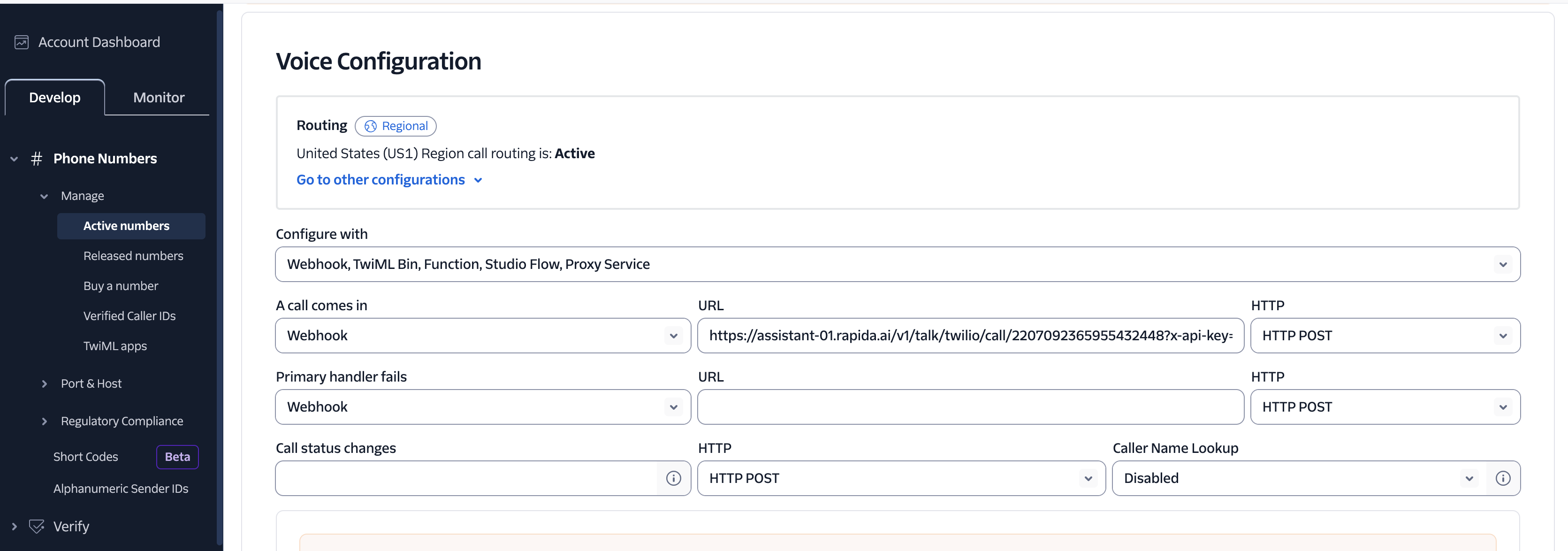
- Click “Save” to apply the changes
Finding Your Assistant ID
To find your assistant ID:- Log in to your Rapida dashboard
- Open the AI Assistants module
- Select your assistant
- The assistant ID can be found in the URL or in the assistant’s settings
Security Considerations
- Keep your Rapida API key confidential
- Consider using Twilio’s request validation to ensure that only Twilio can access your webhook
- Monitor your Twilio logs for unauthorized access attempts
Testing Your Configuration
After setting up your Twilio handler URL:- Call your Twilio phone number
- You should be connected to your Rapida AI Assistant
- Check the Rapida logs if you encounter any issues