

Quickstart
1
Create an AgentKit assistant in Rapida
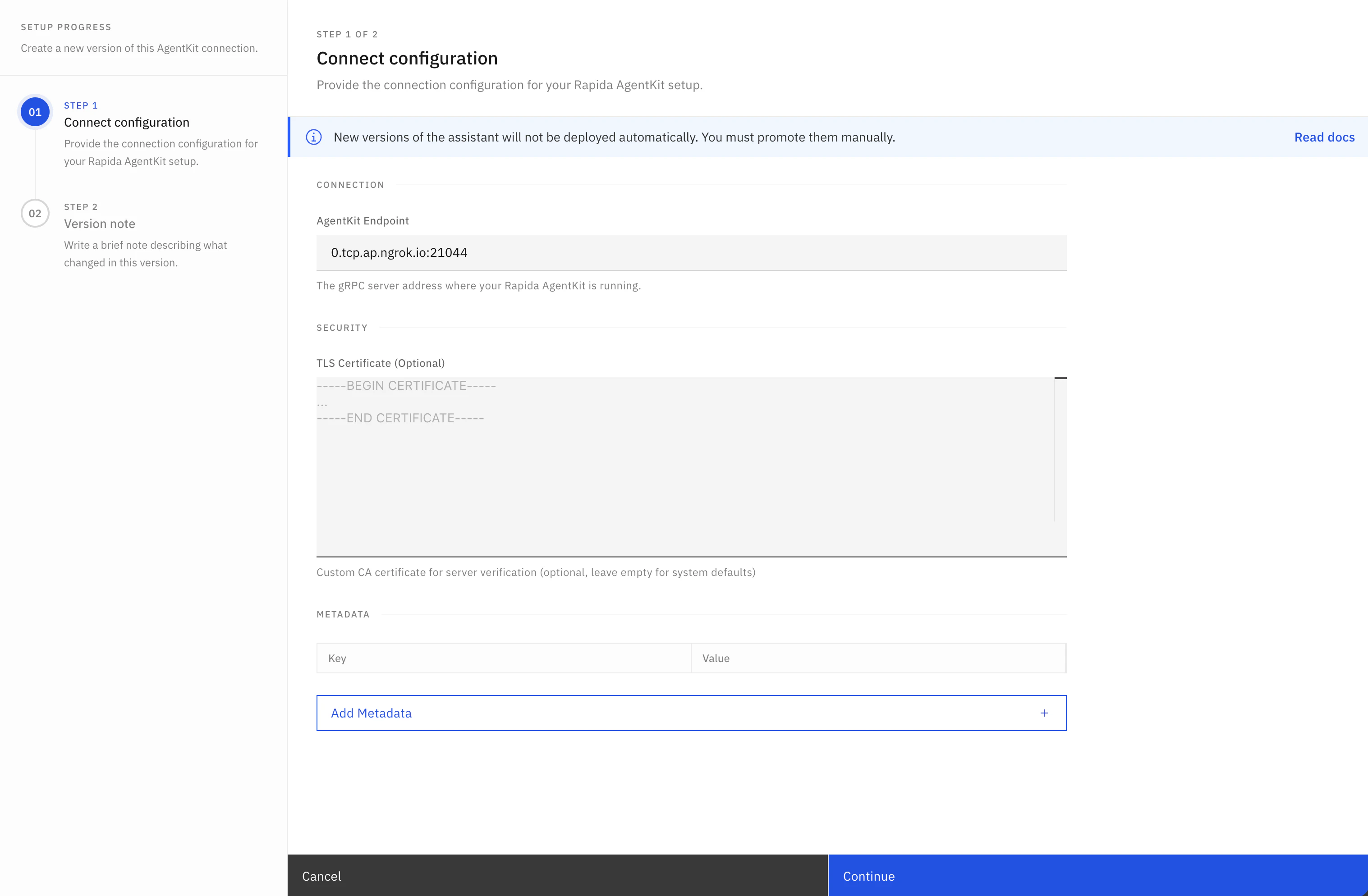
- Open your Rapida dashboard and create (or edit) an assistant.
- In provider/model settings, choose AgentKit as the LLM backend.
- Configure the AgentKit connection:
- AgentKit endpoint: your gRPC server address, such as
agent.your-domain.com:50051 - Metadata: gRPC metadata sent on the
Talkstream, such asauthorizationor tenant routing keys - Connection tuning: connect timeout, keepalive, and max message sizes
- Security: transport security, TLS verification, TLS server name, and optional CA certificate
- AgentKit endpoint: your gRPC server address, such as
- Save the assistant version and release it.
- Attach your voice deployment channel (phone/web/etc.) to this version.
Your AgentKit endpoint must be reachable from the Rapida network and should be provided as
host:port, without http://, https://, or grpc://. Localhost works only for local development setups where connectivity is bridged.2
Start from official examples
Use the Python or Node.js starter depending on your backend stack.Node.js reference implementation:
agentkit/index.js.3
Implement required stream flow
Implement Node.js servers implement the same flow by extending
Talk(...) using the lifecycle contract described in Stream Lifecycle below.Minimum required order:- handle
initializationfirst and acknowledge it - handle optional
configurationupdates - process
messageturns and stream assistant/tool outputs
AgentKitAgent and writing responses to the gRPC stream:4
Implement tool lifecycle
For each tool execution in your backend:For call-ending directives (
- emit
tool_call(...) - execute tool locally
- emit
tool_call_result(...) - continue assistant response (or send call directive)
END_CONVERSATION / TRANSFER_CONVERSATION), include toolId and name in the directive payload.5
Configure security
Token auth:In Rapida, add the same token as AgentKit metadata. For example, set metadata key
authorization to the shared token if your server checks the gRPC authorization metadata key.TLS:6
Validate before customer traffic
Use the test client:Validate:
- initialization acknowledgement
- assistant chunks and final response
- tool call and tool call result events (for tooling flows)
AgentKit configuration options
AgentKit versions store both the backend address and the gRPC connection policy. Use the same fields when you create a new AgentKit assistant or create a new AgentKit version for an existing assistant.Runtime overrides
You can override AgentKit connection settings for a single outbound phone call by passingagentkit.* keys in CreatePhoneCallRequest.options. Runtime overrides apply only to the conversation being created.
agentkit.* keys configure Rapida’s connection to your AgentKit server. They are not forwarded in the AgentKit initialization payload. Other call options remain available to your backend through the initialization options map.API shape
Useagentkit inside CreateAssistantProviderRequest for both initial assistant creation and new AgentKit versions.
Stream Lifecycle
The AgentKit stream is long-lived and stateful. Treat it as a lifecycle, not as isolated RPC requests.Lifecycle phases
Turn-level sequence (recommended)
- Receive
messageand extractmsg_id+ text. - Emit one or more
assistant_response(..., completed=False)chunks. - If tool is needed:
- emit
tool_call(msg_id, tool_id, name, args) - execute tool
- emit
tool_call_result(msg_id, tool_id, name, result, success=...)
- emit
- Emit final
assistant_response(..., completed=True)for that turn. - Repeat for next
messageframe until stream closes.
State and correlation rules
initializationis always first and must be acknowledged.assistant.id,toolCall.id, andtoolCallResult.idshould match the currentmessage.id.tool_idmust be stable betweentool_callandtool_call_result.- Final assistant frame per user turn must set
completed=True. - For call-ending/transfer directives, include
toolIdandnamefor correlation.
Request Types (TalkInput)
Response Types (TalkOutput)
Keep the same
tool_id between tool_call and tool_call_result. For call-ending directives, include toolId and name for correlation.Utilities
Response Builder Utilities (AgentKitAgent)
Request Helper Utilities (AgentKitAgent)
Local Development Setup (ngrok)
For local development, expose your AgentKit server to Rapida with ngrok:tcp://0.tcp.ngrok.io:12345
0.tcp.ngrok.io:12345) as the AgentKit URL in your Rapida assistant configuration.
Development notes:
- keep the local AgentKit server running on port
50051during testing - if auth is enabled, set the same token in Rapida AgentKit provider config
- if ngrok restarts, the endpoint changes unless a reserved domain is configured
Example Matrix (GitHub)
Python base path:https://github.com/rapidaai/rapida-python-recipes/tree/main
https://github.com/rapidaai/rapida-nodejs-recipes/tree/main
Production Checklist
- handle
initializationfirst on every stream - always send final
assistant_response(..., completed=True) - keep
tool_idconsistent betweentool_callandtool_call_result - include
toolId+namefor call-ending directives - do not hardcode secrets in source code
- configure TLS + auth for production
- review AgentKit scaling before production traffic