> ## Documentation Index
> Fetch the complete documentation index at: https://doc.rapida.ai/llms.txt
> Use this file to discover all available pages before exploring further.
# Overview
> Seamlessly integrate LLMs into your application with powerful, flexible endpoints
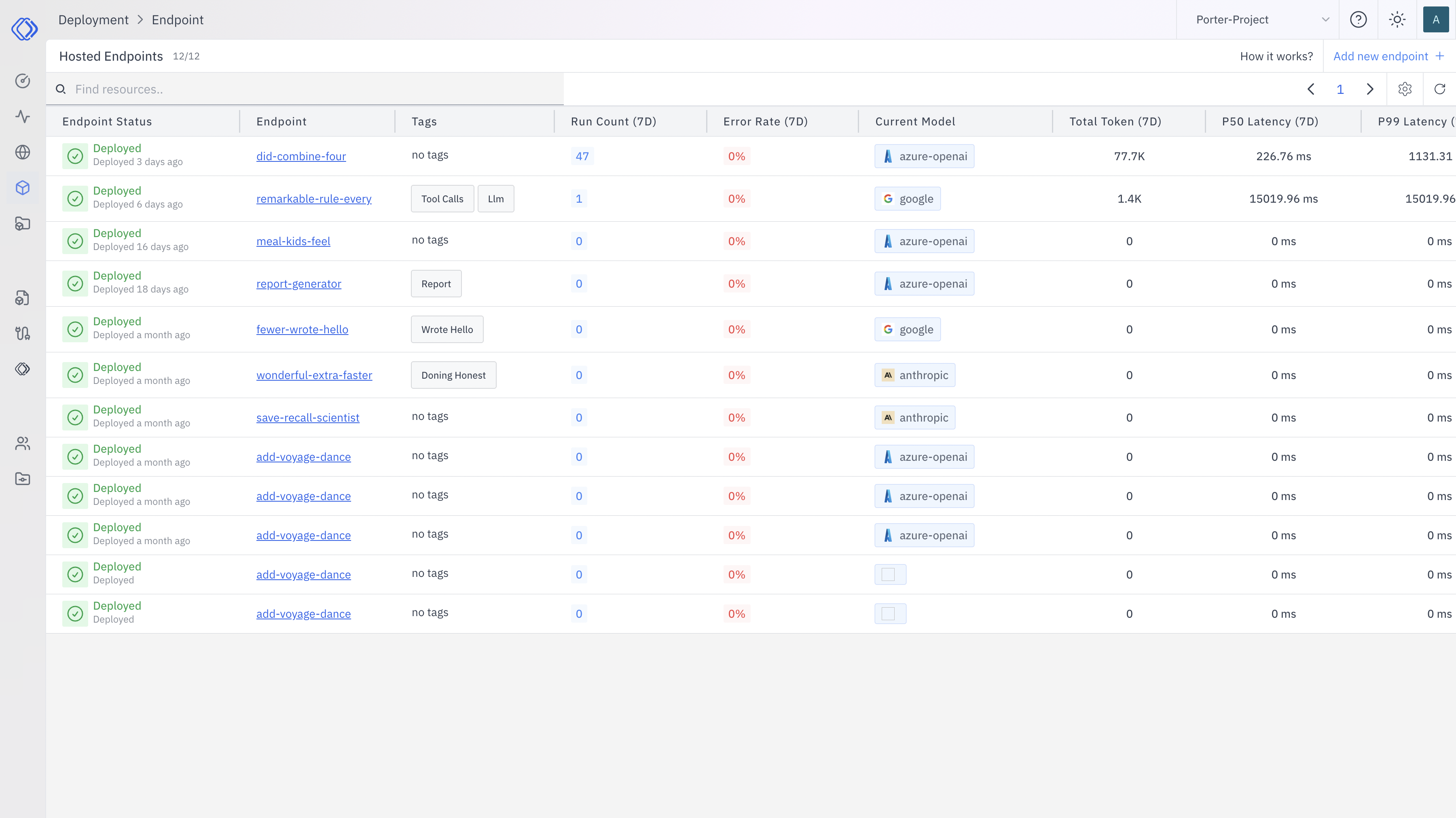
Rapida endpoints are the cornerstone of integrating Large Language Models (LLMs) into your application. They provide a robust, user-friendly interface between your code and advanced AI capabilities, enabling you to harness the power of LLMs with ease and flexibility.
 ## What are Rapida Endpoints?
Rapida endpoints are specialized access points that allow your application to interact with LLMs efficiently. They handle the complexities of LLM communication, letting you focus on building innovative features rather than managing infrastructure.
## Key Features and Benefits
Integrate LLM capabilities into your app with just a few lines of code,
reducing development time and complexity.
Easily switch between different LLM models without modifying your
application code, future-proofing your AI integration.
Version control and template your prompts for consistent, maintainable, and
scalable LLM interactions.
Benefit from built-in caching and request batching to improve response times
and reduce costs.
## Common Use Cases
Rapida endpoints empower a wide range of AI-driven functionalities:
Create high-quality text, from articles to product descriptions, tailored to
your specific needs.
Extract insights, sentiment, and key information from large volumes of text
data.
Build sophisticated chatbots and virtual assistants with natural language
understanding.
Generate concise summaries of lengthy documents or conversations.
Provide accurate, context-aware translations across multiple languages.
## Getting Started
To begin using Rapida endpoints in your project:
1. Sign up for a Rapida account and obtain your API key.
2. Choose the appropriate endpoint for your use case from our documentation.
3. Make your first API call using our easy-to-follow code examples.
Check out the [API Reference](/api-reference/installation) for SDK setup and a step-by-step tutorial.
## Best Practices
To maximize the effectiveness of Rapida endpoints:
* Use prompt templates to maintain consistency across your application.
* Implement proper error handling to manage rate limits and unexpected responses.
* Monitor your usage and optimize prompts for better performance and cost-efficiency.
* Regularly update to the latest endpoint versions for new features and improvements.
## Conclusion
Rapida endpoints provide a powerful, flexible, and user-friendly way to integrate cutting-edge LLM capabilities into your applications. By leveraging our robust infrastructure and intuitive API, you can focus on creating innovative AI-powered features that set your product apart. Start exploring the possibilities with Rapida endpoints today!
## What are Rapida Endpoints?
Rapida endpoints are specialized access points that allow your application to interact with LLMs efficiently. They handle the complexities of LLM communication, letting you focus on building innovative features rather than managing infrastructure.
## Key Features and Benefits
Integrate LLM capabilities into your app with just a few lines of code,
reducing development time and complexity.
Easily switch between different LLM models without modifying your
application code, future-proofing your AI integration.
Version control and template your prompts for consistent, maintainable, and
scalable LLM interactions.
Benefit from built-in caching and request batching to improve response times
and reduce costs.
## Common Use Cases
Rapida endpoints empower a wide range of AI-driven functionalities:
Create high-quality text, from articles to product descriptions, tailored to
your specific needs.
Extract insights, sentiment, and key information from large volumes of text
data.
Build sophisticated chatbots and virtual assistants with natural language
understanding.
Generate concise summaries of lengthy documents or conversations.
Provide accurate, context-aware translations across multiple languages.
## Getting Started
To begin using Rapida endpoints in your project:
1. Sign up for a Rapida account and obtain your API key.
2. Choose the appropriate endpoint for your use case from our documentation.
3. Make your first API call using our easy-to-follow code examples.
Check out the [API Reference](/api-reference/installation) for SDK setup and a step-by-step tutorial.
## Best Practices
To maximize the effectiveness of Rapida endpoints:
* Use prompt templates to maintain consistency across your application.
* Implement proper error handling to manage rate limits and unexpected responses.
* Monitor your usage and optimize prompts for better performance and cost-efficiency.
* Regularly update to the latest endpoint versions for new features and improvements.
## Conclusion
Rapida endpoints provide a powerful, flexible, and user-friendly way to integrate cutting-edge LLM capabilities into your applications. By leveraging our robust infrastructure and intuitive API, you can focus on creating innovative AI-powered features that set your product apart. Start exploring the possibilities with Rapida endpoints today!