> ## Documentation Index
> Fetch the complete documentation index at: https://doc.rapida.ai/llms.txt
> Use this file to discover all available pages before exploring further.
# Overview
> Configure webhooks to receive call, conversation, and WebRTC events
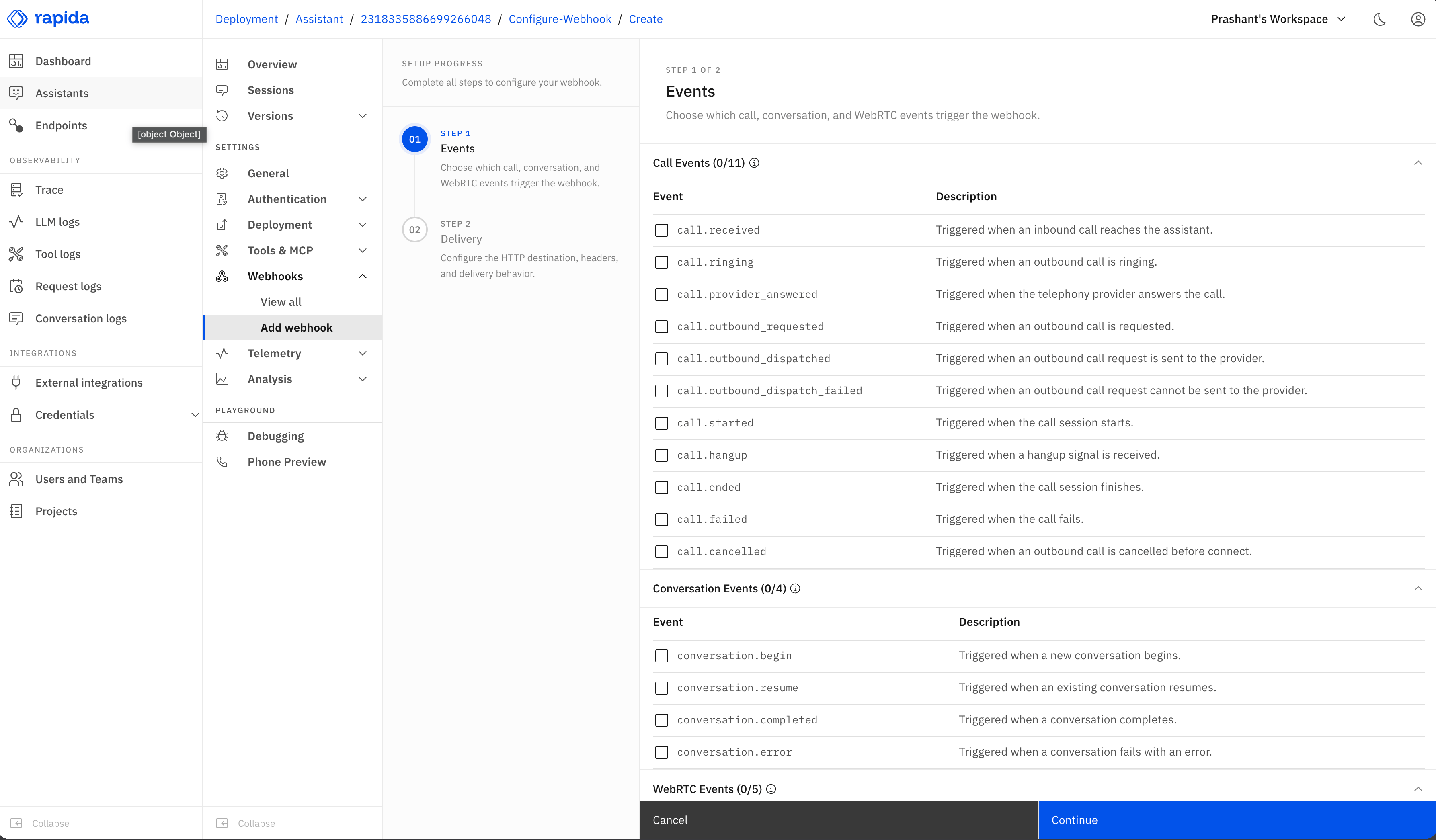
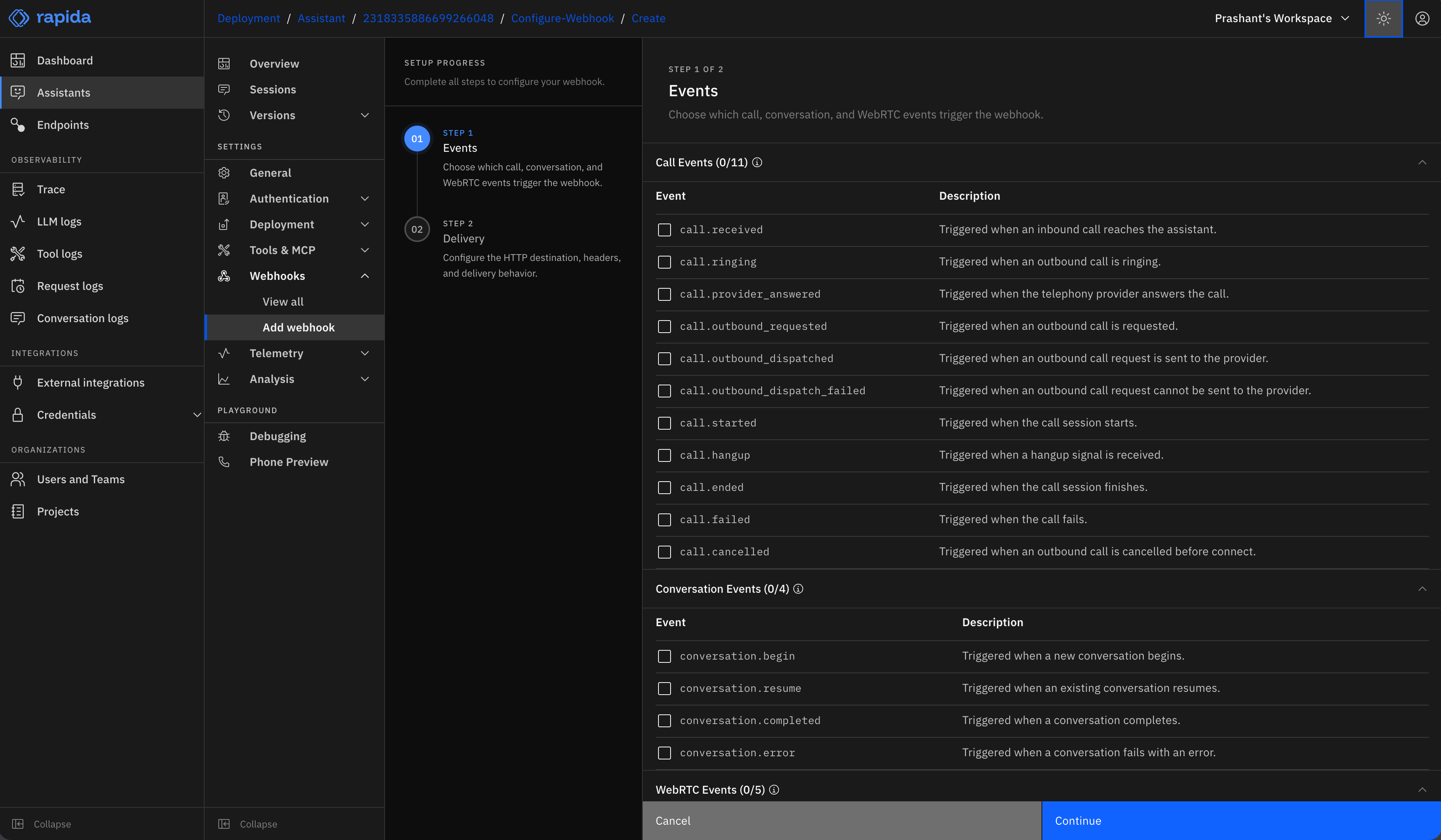
Webhooks send call, conversation, and WebRTC events from Rapida to your HTTP endpoint. Use them to sync call status, media state, conversation state, transcripts, metadata, metrics, and post-call analysis results with your own systems.
 ## What are webhooks?
Webhooks are automated HTTP requests sent when a call, WebRTC media session, or assistant conversation reaches a configured event. They enable you to:
* Receive real-time updates about call, media, and conversation status
* Collect conversation data for analysis or storage
* Trigger actions in external systems based on call, WebRTC, or conversation events
## Events
### Call events
| Event | When it is sent |
| ------------------------------- | --------------------------------------------------------- |
| `call.received` | An inbound call reaches the assistant. |
| `call.ringing` | An outbound call is ringing. |
| `call.provider_answered` | The telephony provider answers the call. |
| `call.outbound_requested` | An outbound call is requested. |
| `call.outbound_dispatched` | The outbound call request is sent to the provider. |
| `call.outbound_dispatch_failed` | The outbound call request cannot be sent to the provider. |
| `call.started` | The call media session starts. |
| `call.hangup` | A hangup signal is received. |
| `call.ended` | The call session finishes. |
| `call.failed` | The call fails. |
| `call.cancelled` | An outbound call is cancelled before connection. |
### WebRTC events
| Event | When it is sent | Payload notes |
| ----------------------------- | ------------------------------------------------------------- | ---------------------------------------------------------------------------------------------------------------------------------- |
| `webrtc.connected` | The WebRTC media connection is established. | Includes `session_id`, `media_session_id`, `ice_latency_ms`, and `peer_connection_state`. |
| `webrtc.audio_track_received` | The remote WebRTC audio track is received. | Includes `session_id`, `media_session_id`, and negotiated `codec`. |
| `webrtc.reconnecting` | The WebRTC media connection starts recovery. | Includes `type`, `session_id`, `media_session_id`, `reason`, `restart_attempt`, and `restart_limit`. |
| `webrtc.failed` | The WebRTC media connection fails or falls back to text mode. | Includes failure `type`, `session_id`, `reason`, and optional `media_session_id`, `error`, `fallback`, or `peer_connection_state`. |
| `webrtc.disconnected` | The WebRTC media connection disconnects or closes. | Includes `session_id`, `media_session_id`, `reason`, and optional `type` or `peer_connection_state`. |
### Conversation events
| Event | When it is sent | Payload notes |
| ------------------------ | ---------------------------------------------------------- | ----------------------------------------------------------------------------------------------------------------------------------------- |
| `conversation.begin` | A new conversation is initialized. | Includes assistant ID, conversation ID, source, identifier, and `is_new`. |
| `conversation.resume` | An existing conversation is resumed. | Includes assistant ID, conversation ID, source, identifier, and message count. |
| `conversation.completed` | The conversation finalization flow completes successfully. | Post-call analysis runs before this webhook is recorded, so analysis output is included in `data.metadata` as `analysis.`. |
| `conversation.error` | The conversation hits an unrecoverable error. | Includes assistant and conversation IDs when available, plus the error reason and message. |
## Payload shape
All webhook requests are sent as JSON. The top-level envelope is consistent across event types:
```json theme={null}
{
"event": "call.started",
"assistant": {
"id": 2193965165215481856
},
"conversation": {
"id": 2216964057603244032
},
"data": {
"context_id": "ctx_123",
"provider": "twilio",
"direction": "inbound"
}
}
```
The `conversation` object is included when the event is tied to a conversation. Event-specific fields are always inside `data`; `context_id` is not sent as a separate top-level field.
### Call payloads
Call event payloads include the available call lifecycle fields. Common keys are `provider`, `direction`, `caller`, `to`, `from`, `context_id`, `channel_uuid`, `status_event`, `provider_response`, `stage`, `reason`, `status`, `duration_ms`, `call_status`, `failure_class`, `failure_reason`, `disconnect_reason`, `provider_status_code`, `retryable`, and `error`.
```json theme={null}
{
"event": "call.ended",
"assistant": {
"id": 2193965165215481856
},
"conversation": {
"id": 2216964057603244032
},
"data": {
"context_id": "ctx_123",
"provider": "twilio",
"direction": "outbound",
"caller": "+14155550100",
"from": "+14155550199",
"channel_uuid": "CA123",
"reason": "talk_completed",
"status": "COMPLETE",
"duration_ms": 92840
}
}
```
### WebRTC payloads
WebRTC events use the same envelope and include media-session fields in `data`.
```json theme={null}
{
"event": "webrtc.connected",
"assistant": {
"id": 2193965165215481856
},
"conversation": {
"id": 2216964057603244032
},
"data": {
"session_id": "2f2e6c8f-0b2d-4a5f-86da-7c7f3f7b3f92",
"media_session_id": 3,
"ice_latency_ms": 42,
"peer_connection_state": "connected"
}
}
```
For `webrtc.reconnecting`, `data.type` is usually `ice_restarting` or `media_session_restarting`. For `webrtc.failed`, `data.type` can include values such as `peer_failed`, `media_session_start_failed`, `media_session_restart_failed`, or `media_restart_limit_reached`.
### Conversation payloads
`conversation.begin` includes source and identifier context for a new conversation:
```json theme={null}
{
"event": "conversation.begin",
"assistant": {
"id": 2193965165215481856
},
"conversation": {
"id": 2216964057603244032
},
"data": {
"source": "phone-call",
"is_new": "true",
"identifier": "+14155550100"
}
}
```
`conversation.resume` includes the same source and identifier context plus the current `message_count`.
The default `conversation.completed` payload has this structure:
```json theme={null}
{
"event": "conversation.completed",
"assistant": {
"id": 2193965165215481856
},
"conversation": {
"id": 2216964057603244032
},
"data": {
"reason": "conversation_completed",
"status": "completed",
"messages": [
{
"id": "msg-user-1",
"role": "user",
"content": "hello"
},
{
"id": "msg-assistant-1",
"role": "assistant",
"content": "Hi there. How can I help?"
}
],
"metadata": {
"customer_id": "cus_123",
"analysis.conversation_summary": {
"sentiment": "positive",
"summary": "The user asked about account setup."
}
},
"metrics": [
{
"name": "conversation_status",
"value": "COMPLETE",
"description": "Status of current conversation"
}
]
}
}
```
Analysis values are only available on `conversation.completed`. Call and WebRTC events do not include post-call analysis output. If an analysis endpoint fails, the completed webhook is still sent, but the failed analysis key is omitted from `data.metadata`.
`conversation.error` includes the terminal error reason and message:
```json theme={null}
{
"event": "conversation.error",
"assistant": {
"id": 2193965165215481856
},
"conversation": {
"id": 2216964057603244032
},
"data": {
"reason": "DISCONNECTION_TYPE_ERROR",
"message": "tts provider rejected credentials"
}
}
```
## Configuration options
* **HTTP method**: Select the HTTP method used for delivery. `POST` is the default for most integrations.
* **Server URL**: Set the endpoint that receives webhook requests.
* **Headers**: Add authentication headers or any required integration headers.
* **Retry status entries**: Configure response status entries used by the delivery retry policy.
* **Retry count**: Set how many times Rapida should retry delivery for retryable failures.
* **Timeout**: Set how long Rapida should wait for your endpoint to respond.
## Use Cases
Set up webhooks to receive instant notifications about call, media, and conversation starts, completions, or failures. This allows you to monitor assistant performance and user engagement in real time.
Collect conversation data and analysis results through webhooks to feed into your analytics pipeline. This can help you gain insights into user behavior, common queries, and assistant effectiveness.
Use webhooks to automatically update customer records in your CRM system based
on conversation outcomes. This ensures your customer data stays current
without manual intervention.
Trigger automated actions in your systems based on specific conversation
events or outcomes. For example, create support tickets, send follow-up
emails, or update inventory based on user interactions.
Maintain a comprehensive log of all assistant conversations by capturing
webhook data. This can be crucial for compliance, training, and quality
assurance purposes.
Integrate webhook data with your omnichannel support system to provide seamless customer experiences across various platforms and touchpoints.
## What are webhooks?
Webhooks are automated HTTP requests sent when a call, WebRTC media session, or assistant conversation reaches a configured event. They enable you to:
* Receive real-time updates about call, media, and conversation status
* Collect conversation data for analysis or storage
* Trigger actions in external systems based on call, WebRTC, or conversation events
## Events
### Call events
| Event | When it is sent |
| ------------------------------- | --------------------------------------------------------- |
| `call.received` | An inbound call reaches the assistant. |
| `call.ringing` | An outbound call is ringing. |
| `call.provider_answered` | The telephony provider answers the call. |
| `call.outbound_requested` | An outbound call is requested. |
| `call.outbound_dispatched` | The outbound call request is sent to the provider. |
| `call.outbound_dispatch_failed` | The outbound call request cannot be sent to the provider. |
| `call.started` | The call media session starts. |
| `call.hangup` | A hangup signal is received. |
| `call.ended` | The call session finishes. |
| `call.failed` | The call fails. |
| `call.cancelled` | An outbound call is cancelled before connection. |
### WebRTC events
| Event | When it is sent | Payload notes |
| ----------------------------- | ------------------------------------------------------------- | ---------------------------------------------------------------------------------------------------------------------------------- |
| `webrtc.connected` | The WebRTC media connection is established. | Includes `session_id`, `media_session_id`, `ice_latency_ms`, and `peer_connection_state`. |
| `webrtc.audio_track_received` | The remote WebRTC audio track is received. | Includes `session_id`, `media_session_id`, and negotiated `codec`. |
| `webrtc.reconnecting` | The WebRTC media connection starts recovery. | Includes `type`, `session_id`, `media_session_id`, `reason`, `restart_attempt`, and `restart_limit`. |
| `webrtc.failed` | The WebRTC media connection fails or falls back to text mode. | Includes failure `type`, `session_id`, `reason`, and optional `media_session_id`, `error`, `fallback`, or `peer_connection_state`. |
| `webrtc.disconnected` | The WebRTC media connection disconnects or closes. | Includes `session_id`, `media_session_id`, `reason`, and optional `type` or `peer_connection_state`. |
### Conversation events
| Event | When it is sent | Payload notes |
| ------------------------ | ---------------------------------------------------------- | ----------------------------------------------------------------------------------------------------------------------------------------- |
| `conversation.begin` | A new conversation is initialized. | Includes assistant ID, conversation ID, source, identifier, and `is_new`. |
| `conversation.resume` | An existing conversation is resumed. | Includes assistant ID, conversation ID, source, identifier, and message count. |
| `conversation.completed` | The conversation finalization flow completes successfully. | Post-call analysis runs before this webhook is recorded, so analysis output is included in `data.metadata` as `analysis.`. |
| `conversation.error` | The conversation hits an unrecoverable error. | Includes assistant and conversation IDs when available, plus the error reason and message. |
## Payload shape
All webhook requests are sent as JSON. The top-level envelope is consistent across event types:
```json theme={null}
{
"event": "call.started",
"assistant": {
"id": 2193965165215481856
},
"conversation": {
"id": 2216964057603244032
},
"data": {
"context_id": "ctx_123",
"provider": "twilio",
"direction": "inbound"
}
}
```
The `conversation` object is included when the event is tied to a conversation. Event-specific fields are always inside `data`; `context_id` is not sent as a separate top-level field.
### Call payloads
Call event payloads include the available call lifecycle fields. Common keys are `provider`, `direction`, `caller`, `to`, `from`, `context_id`, `channel_uuid`, `status_event`, `provider_response`, `stage`, `reason`, `status`, `duration_ms`, `call_status`, `failure_class`, `failure_reason`, `disconnect_reason`, `provider_status_code`, `retryable`, and `error`.
```json theme={null}
{
"event": "call.ended",
"assistant": {
"id": 2193965165215481856
},
"conversation": {
"id": 2216964057603244032
},
"data": {
"context_id": "ctx_123",
"provider": "twilio",
"direction": "outbound",
"caller": "+14155550100",
"from": "+14155550199",
"channel_uuid": "CA123",
"reason": "talk_completed",
"status": "COMPLETE",
"duration_ms": 92840
}
}
```
### WebRTC payloads
WebRTC events use the same envelope and include media-session fields in `data`.
```json theme={null}
{
"event": "webrtc.connected",
"assistant": {
"id": 2193965165215481856
},
"conversation": {
"id": 2216964057603244032
},
"data": {
"session_id": "2f2e6c8f-0b2d-4a5f-86da-7c7f3f7b3f92",
"media_session_id": 3,
"ice_latency_ms": 42,
"peer_connection_state": "connected"
}
}
```
For `webrtc.reconnecting`, `data.type` is usually `ice_restarting` or `media_session_restarting`. For `webrtc.failed`, `data.type` can include values such as `peer_failed`, `media_session_start_failed`, `media_session_restart_failed`, or `media_restart_limit_reached`.
### Conversation payloads
`conversation.begin` includes source and identifier context for a new conversation:
```json theme={null}
{
"event": "conversation.begin",
"assistant": {
"id": 2193965165215481856
},
"conversation": {
"id": 2216964057603244032
},
"data": {
"source": "phone-call",
"is_new": "true",
"identifier": "+14155550100"
}
}
```
`conversation.resume` includes the same source and identifier context plus the current `message_count`.
The default `conversation.completed` payload has this structure:
```json theme={null}
{
"event": "conversation.completed",
"assistant": {
"id": 2193965165215481856
},
"conversation": {
"id": 2216964057603244032
},
"data": {
"reason": "conversation_completed",
"status": "completed",
"messages": [
{
"id": "msg-user-1",
"role": "user",
"content": "hello"
},
{
"id": "msg-assistant-1",
"role": "assistant",
"content": "Hi there. How can I help?"
}
],
"metadata": {
"customer_id": "cus_123",
"analysis.conversation_summary": {
"sentiment": "positive",
"summary": "The user asked about account setup."
}
},
"metrics": [
{
"name": "conversation_status",
"value": "COMPLETE",
"description": "Status of current conversation"
}
]
}
}
```
Analysis values are only available on `conversation.completed`. Call and WebRTC events do not include post-call analysis output. If an analysis endpoint fails, the completed webhook is still sent, but the failed analysis key is omitted from `data.metadata`.
`conversation.error` includes the terminal error reason and message:
```json theme={null}
{
"event": "conversation.error",
"assistant": {
"id": 2193965165215481856
},
"conversation": {
"id": 2216964057603244032
},
"data": {
"reason": "DISCONNECTION_TYPE_ERROR",
"message": "tts provider rejected credentials"
}
}
```
## Configuration options
* **HTTP method**: Select the HTTP method used for delivery. `POST` is the default for most integrations.
* **Server URL**: Set the endpoint that receives webhook requests.
* **Headers**: Add authentication headers or any required integration headers.
* **Retry status entries**: Configure response status entries used by the delivery retry policy.
* **Retry count**: Set how many times Rapida should retry delivery for retryable failures.
* **Timeout**: Set how long Rapida should wait for your endpoint to respond.
## Use Cases
Set up webhooks to receive instant notifications about call, media, and conversation starts, completions, or failures. This allows you to monitor assistant performance and user engagement in real time.
Collect conversation data and analysis results through webhooks to feed into your analytics pipeline. This can help you gain insights into user behavior, common queries, and assistant effectiveness.
Use webhooks to automatically update customer records in your CRM system based
on conversation outcomes. This ensures your customer data stays current
without manual intervention.
Trigger automated actions in your systems based on specific conversation
events or outcomes. For example, create support tickets, send follow-up
emails, or update inventory based on user interactions.
Maintain a comprehensive log of all assistant conversations by capturing
webhook data. This can be crucial for compliance, training, and quality
assurance purposes.
Integrate webhook data with your omnichannel support system to provide seamless customer experiences across various platforms and touchpoints.