> ## Documentation Index
> Fetch the complete documentation index at: https://doc.rapida.ai/llms.txt
> Use this file to discover all available pages before exploring further.
# Overview
> Step-by-step guide to setting up analysis for your AI assistant
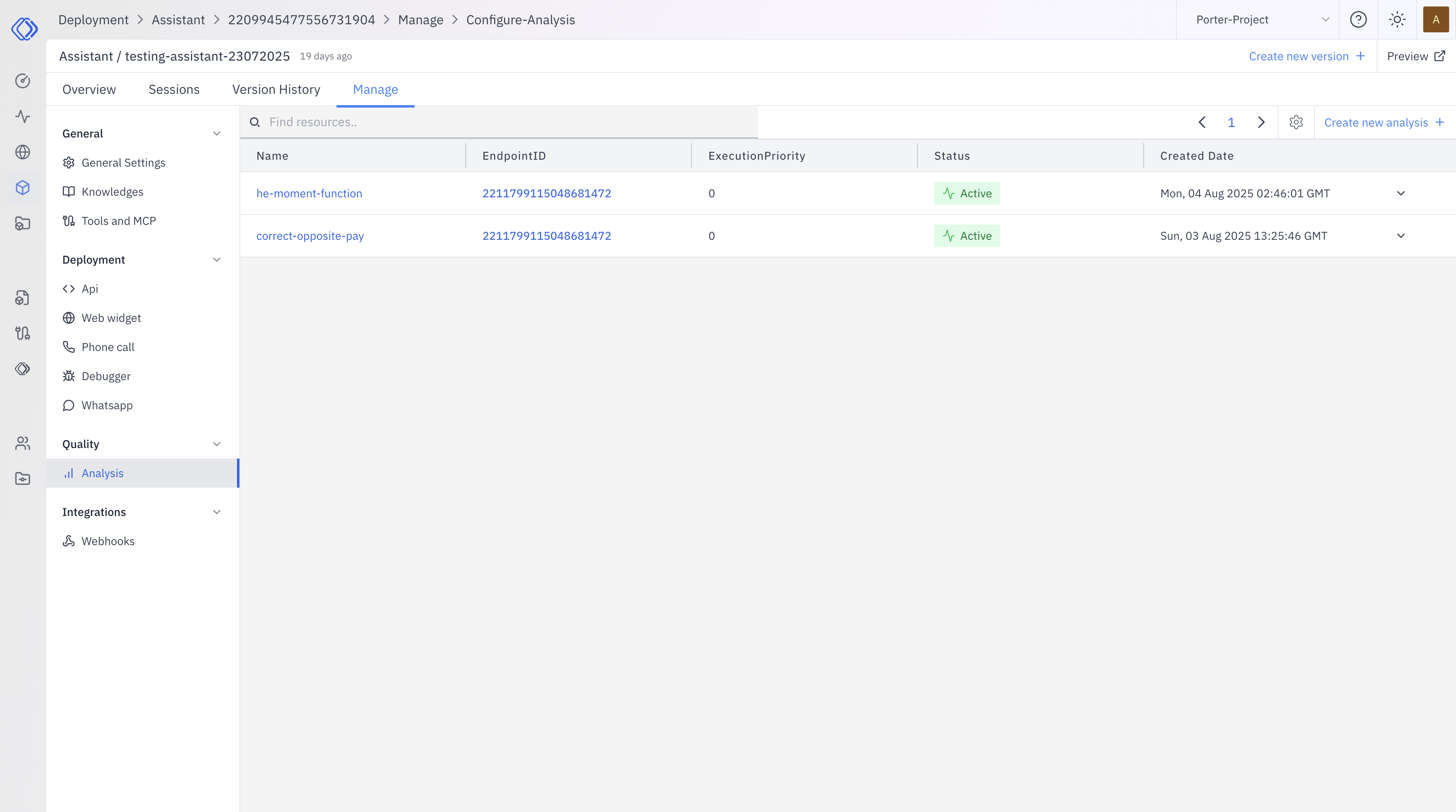
Analysis is a powerful feature that allows you to gain insights from conversations with your AI assistant. This overview explains the key aspects of analysis functionality.
 ## What is Analysis?
Analysis in AI assistants is a process that examines conversation data to extract valuable information, metrics, and insights. It helps you understand how your assistant is performing and how users are interacting with it.
## Key Features of Analysis
1. **Customizable Configuration**: You can set up analysis with specific parameters tailored to your needs.
2. **Flexible Endpoints**: Choose or create endpoints that process the analysis data according to your requirements.
3. **Multiple Parameter Options**:
* Conversation Messages (default)
* Assistant Parameters (name, prompt)
* Custom Arguments
4. **Execution Priority**: Set the order for processing multiple analyses.
5. **Integration with Business Intelligence**: Feed data into your BI tools using assistant webhooks.
## Benefits of Analysis
* Generate conversation insights
* Track user satisfaction
* Identify common questions or issues
* Measure assistant performance
* Inform improvements and optimizations
## Viewing Analysis Results
Analysis results can be viewed for specific conversations:
1. Go to the "Sessions" tab in your assistant
2. Select the desired session
3. Click on the "Analysis" tab in the left panel
The display of results depends on how your endpoint is configured to store and present the information.
## Usecase
Evaluate the effectiveness of interactions between users and your AI assistant. This analysis helps improve coherence, relevance, and overall satisfaction in conversations.
Generate concise summaries of user interactions with your AI assistant, allowing for quick understanding of main points and efficient review of engagements.
Transform unstructured conversation data into structured, actionable insights, enabling advanced analytics and seamless integration with other systems.
Categorize and understand the primary goals of your users, helping to improve assistant responses and tailor your offerings to user needs.
Gauge the emotional tone of user interactions with your AI assistant, allowing you to track satisfaction trends and adjust responses accordingly.
Uncover areas where your AI assistant lacks information or struggles to provide accurate responses, helping prioritize improvements to its knowledge base.
## Note
Analysis functionality is currently in beta mode. Some features may be experimental or subject to change.
To use the analysis feature, you need to create an endpoint that will process the analysis data.
[Learn more about creating endpoints](/endpoint/overview)
## What is Analysis?
Analysis in AI assistants is a process that examines conversation data to extract valuable information, metrics, and insights. It helps you understand how your assistant is performing and how users are interacting with it.
## Key Features of Analysis
1. **Customizable Configuration**: You can set up analysis with specific parameters tailored to your needs.
2. **Flexible Endpoints**: Choose or create endpoints that process the analysis data according to your requirements.
3. **Multiple Parameter Options**:
* Conversation Messages (default)
* Assistant Parameters (name, prompt)
* Custom Arguments
4. **Execution Priority**: Set the order for processing multiple analyses.
5. **Integration with Business Intelligence**: Feed data into your BI tools using assistant webhooks.
## Benefits of Analysis
* Generate conversation insights
* Track user satisfaction
* Identify common questions or issues
* Measure assistant performance
* Inform improvements and optimizations
## Viewing Analysis Results
Analysis results can be viewed for specific conversations:
1. Go to the "Sessions" tab in your assistant
2. Select the desired session
3. Click on the "Analysis" tab in the left panel
The display of results depends on how your endpoint is configured to store and present the information.
## Usecase
Evaluate the effectiveness of interactions between users and your AI assistant. This analysis helps improve coherence, relevance, and overall satisfaction in conversations.
Generate concise summaries of user interactions with your AI assistant, allowing for quick understanding of main points and efficient review of engagements.
Transform unstructured conversation data into structured, actionable insights, enabling advanced analytics and seamless integration with other systems.
Categorize and understand the primary goals of your users, helping to improve assistant responses and tailor your offerings to user needs.
Gauge the emotional tone of user interactions with your AI assistant, allowing you to track satisfaction trends and adjust responses accordingly.
Uncover areas where your AI assistant lacks information or struggles to provide accurate responses, helping prioritize improvements to its knowledge base.
## Note
Analysis functionality is currently in beta mode. Some features may be experimental or subject to change.
To use the analysis feature, you need to create an endpoint that will process the analysis data.
[Learn more about creating endpoints](/endpoint/overview)