> ## Documentation Index
> Fetch the complete documentation index at: https://doc.rapida.ai/llms.txt
> Use this file to discover all available pages before exploring further.
# AgentKit — Custom LLM Backend
> Create an AgentKit assistant in Rapida, connect your own gRPC backend, and go live quickly with production-safe patterns.
AgentKit lets you run your own backend for live voice conversations.
Rapida handles telephony + STT + TTS, while your server handles reasoning and tool execution over a bidirectional gRPC stream.
With AgentKit, you can connect any LLM backend with Rapida over gRPC.
***
## Quickstart
 1. Open your Rapida dashboard and create (or edit) an assistant.
2. In provider/model settings, choose **AgentKit** as the LLM backend.
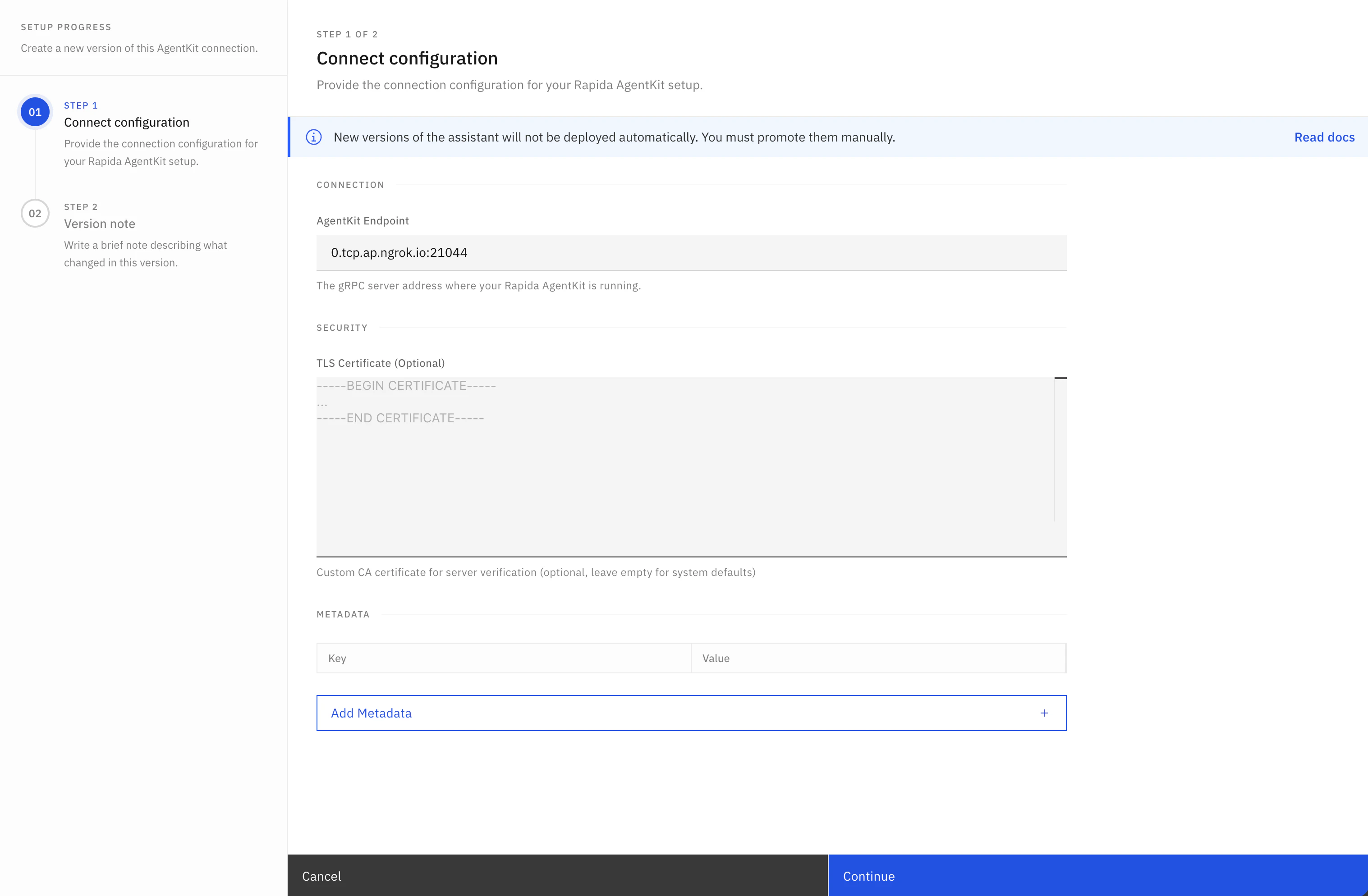
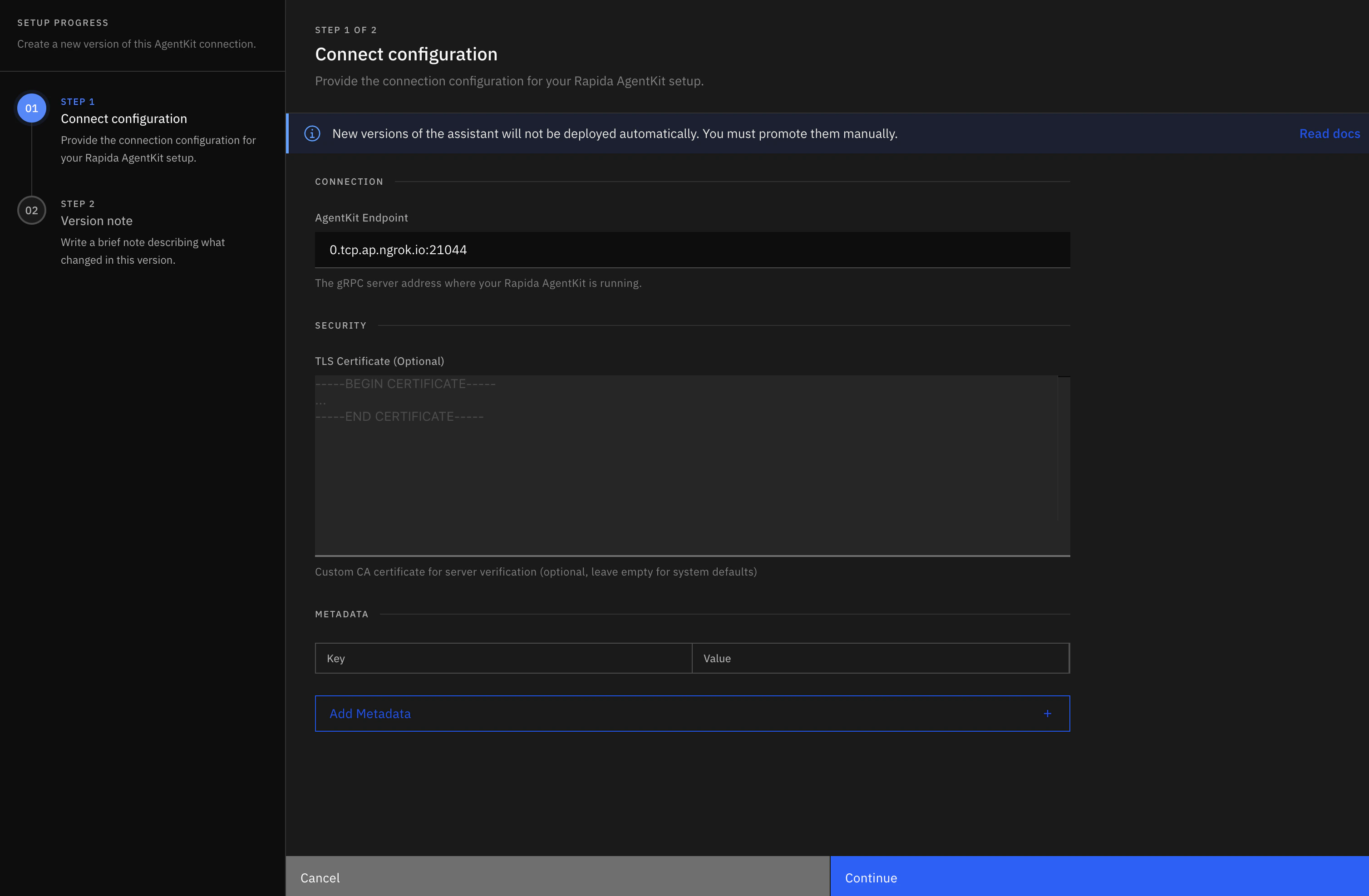
3. Configure the AgentKit connection:
* **AgentKit endpoint**: your gRPC server address, such as `agent.your-domain.com:50051`
* **Metadata**: gRPC metadata sent on the `Talk` stream, such as `authorization` or tenant routing keys
* **Connection tuning**: connect timeout, keepalive, and max message sizes
* **Security**: transport security, TLS verification, TLS server name, and optional CA certificate
4. Save the assistant version and release it.
5. Attach your voice deployment channel (phone/web/etc.) to this version.
Your AgentKit endpoint must be reachable from the Rapida network and should be provided as `host:port`, without `http://`, `https://`, or `grpc://`. Localhost works only for local development setups where connectivity is bridged.
Use the Python or Node.js starter depending on your backend stack.
```bash Python theme={null}
git clone https://github.com/rapidaai/rapida-python-recipes.git
cd rapida-python-recipes
pip install -r requirements.txt
cd examples/python/agentkit
export OPENAI_API_KEY=""
python main.py --host 0.0.0.0 --port 50051
```
```bash Node.js theme={null}
git clone https://github.com/rapidaai/rapida-nodejs-recipes.git
cd rapida-nodejs-recipes
npm install
export AGENTKIT_PORT=50051
# Optional. Enables token auth on gRPC metadata key: authorization
export AGENTKIT_TOKEN=""
node agentkit/index.js
```
Node.js reference implementation: `agentkit/index.js`.
Implement `Talk(...)` using the lifecycle contract described in **Stream Lifecycle** below.
Minimum required order:
1. handle `initialization` first and acknowledge it
2. handle optional `configuration` updates
3. process `message` turns and stream assistant/tool outputs
```python theme={null}
def Talk(self, request_iterator, context):
for request in request_iterator:
if self.is_initialization_request(request):
yield self.initialization_response(request.initialization)
elif self.is_configuration_request(request):
yield self.configuration_response(request.configuration)
elif self.is_message_request(request):
if not self.is_text_message(request):
yield self.error_response(501, "Audio not implemented")
continue
msg_id = self.get_message_id(request)
yield self.assistant_response(msg_id, "Working on it... ", completed=False)
yield self.assistant_response(msg_id, "Done.", completed=True)
else:
yield self.error_response(400, "Unknown request type")
```
If `initialization` is not handled first, conversations can fail with request-shape errors.
Node.js servers implement the same flow by extending `AgentKitAgent` and writing responses to the gRPC stream:
```js theme={null}
import { AgentKitAgent, AgentKitServer } from "@rapidaai/nodejs";
class EchoAgent extends AgentKitAgent {
talk(call) {
call.on("data", (request) => {
if (this.isInitializationRequest(request)) {
call.write(this.initializationResponse(request.getInitialization()));
return;
}
if (this.isConfigurationRequest(request)) {
call.write(this.configurationResponse(request.getConfiguration()));
return;
}
if (this.isTextMessage(request)) {
const messageId = this.getMessageId(request);
const text = this.getUserText(request);
call.write(this.assistantResponse(messageId, `You said: ${text}`, false));
call.write(
this.assistantResponse(
messageId,
"Thanks, I received your message.",
true
)
);
}
});
call.on("end", () => call.end());
}
}
const server = new AgentKitServer({
agent: new EchoAgent(),
port: Number(process.env.AGENTKIT_PORT || 50051),
});
await server.start();
```
For each tool execution in your backend:
1. emit `tool_call(...)`
2. execute tool locally
3. emit `tool_call_result(...)`
4. continue assistant response (or send call directive)
```python theme={null}
import uuid
tool_id = str(uuid.uuid4())
yield self.tool_call(msg_id, tool_id, "get_weather", {"city": "London"})
result = {"city": "London", "temp_c": 22}
yield self.tool_call_result(msg_id, tool_id, "get_weather", result, success=True)
yield self.assistant_response(msg_id, "In London it's 22°C.", completed=True)
```
For call-ending directives (`END_CONVERSATION` / `TRANSFER_CONVERSATION`), include `toolId` and `name` in the directive payload.
Token auth:
```python theme={null}
server = AgentKitServer(
agent=MyAgent(),
host="0.0.0.0",
port=50051,
auth_config={"enabled": True, "token": os.getenv("AGENTKIT_TOKEN")},
)
```
In Rapida, add the same token as AgentKit metadata. For example, set metadata key `authorization` to the shared token if your server checks the gRPC `authorization` metadata key.
TLS:
```python theme={null}
server = AgentKitServer(
agent=MyAgent(),
host="0.0.0.0",
port=50051,
ssl_config={
"cert_path": "/etc/ssl/server.crt",
"key_path": "/etc/ssl/server.key",
},
)
```
Use the test client:
```bash theme={null}
python examples/python/executor/agentkit/test_client.py localhost:50051
```
Validate:
* initialization acknowledgement
* assistant chunks and final response
* tool call and tool call result events (for tooling flows)
***
## AgentKit configuration options
AgentKit versions store both the backend address and the gRPC connection policy. Use the same fields when you create a new AgentKit assistant or create a new AgentKit version for an existing assistant.
| Setting | API field | Default | Allowed values or range | When to change it |
| ------------------------ | --------------------- | ------------- | --------------------------- | --------------------------------------------------------------------------- |
| AgentKit endpoint | `agentKitUrl` | Required | `host` or `host:port` | Set this to the reachable gRPC endpoint for your backend. |
| Metadata | `metadata` | `{}` | String key/value map | Pass auth tokens, tenant IDs, or routing headers as gRPC metadata. |
| Transport security | `transportSecurity` | `TLS` | `TLS`, `PLAINTEXT` | Use `PLAINTEXT` only for trusted private networks or local testing. |
| TLS verification | `tlsVerification` | `VERIFY` | `VERIFY`, `SKIP_VERIFY` | Use `SKIP_VERIFY` only while diagnosing certificate issues. |
| TLS server name | `tlsServerName` | Endpoint host | DNS name | Set this when the certificate SAN does not match the dial address. |
| TLS certificate | `certificate` | Empty | PEM CA certificate | Add a CA certificate for private or self-signed TLS. |
| Connect timeout | `connectTimeoutMs` | `10000` | `1` to `300000` ms | Raise this for slow private links; lower it to fail over faster. |
| Keepalive time | `keepaliveTimeMs` | `30000` | `10000` to `3600000` ms | Controls how often the client sends keepalive pings. |
| Keepalive timeout | `keepaliveTimeoutMs` | `10000` | `1000` to `300000` ms | Controls how long Rapida waits for a keepalive response. |
| Max receive message size | `maxRecvMessageBytes` | `16777216` | `1024` to `104857600` bytes | Increase for large tool results or custom payloads. |
| Max send message size | `maxSendMessageBytes` | `16777216` | `1024` to `104857600` bytes | Increase if your backend receives large initialization or message payloads. |
Do not use `SKIP_VERIFY` or `PLAINTEXT` for production internet-facing traffic unless the connection is protected by another trusted network boundary.
### API shape
Use `agentkit` inside `CreateAssistantProviderRequest` for both initial assistant creation and new AgentKit versions.
```json theme={null}
{
"assistantId": "2227823180112723968",
"description": "Move AgentKit to the production backend",
"agentkit": {
"agentKitUrl": "agent.your-domain.com:50051",
"metadata": {
"authorization": "shared-token",
"tenant": "acme"
},
"transportSecurity": "TLS",
"tlsVerification": "VERIFY",
"tlsServerName": "agent.your-domain.com",
"connectTimeoutMs": 10000,
"keepaliveTimeMs": 30000,
"keepaliveTimeoutMs": 10000,
"maxRecvMessageBytes": 16777216,
"maxSendMessageBytes": 16777216,
"certificate": "-----BEGIN CERTIFICATE-----\n...\n-----END CERTIFICATE-----"
}
}
```
See [Create assistant provider](/api-reference/assistant/create-assistant-provider) for SDK examples.
***
## Stream Lifecycle
The AgentKit stream is long-lived and stateful. Treat it as a lifecycle, not as isolated RPC requests.
### Lifecycle phases
| Phase | Inbound frame from Rapida | Outbound frame from your backend | Required | Purpose |
| ----------------- | ---------------------------------- | --------------------------------------------- | -------------- | ---------------------------------------------------- |
| 1. Handshake | `initialization` | `initialization_response(...)` | Yes | Establish conversation identity and runtime context. |
| 2. Runtime config | `configuration` | `configuration_response(...)` | Optional | Apply stream-mode/runtime updates. |
| 3. User turn | `message` | `assistant_response(...)` chunks + final | Yes (per turn) | Return assistant output for each user turn. |
| 4. Tool execution | Internal tool decision during turn | `tool_call(...)` then `tool_call_result(...)` | Optional | Report tool lifecycle and results. |
| 5. Call directive | Internal decision to transfer/end | `toolCall` with action + `toolId` + `name` | Optional | Signal call transfer or termination. |
| 6. Termination | Client/server closes stream | none (or final error/event) | Yes | End stream cleanly and release resources. |
### Turn-level sequence (recommended)
1. Receive `message` and extract `msg_id` + text.
2. Emit one or more `assistant_response(..., completed=False)` chunks.
3. If tool is needed:
* emit `tool_call(msg_id, tool_id, name, args)`
* execute tool
* emit `tool_call_result(msg_id, tool_id, name, result, success=...)`
4. Emit final `assistant_response(..., completed=True)` for that turn.
5. Repeat for next `message` frame until stream closes.
### State and correlation rules
* `initialization` is always first and must be acknowledged.
* `assistant.id`, `toolCall.id`, and `toolCallResult.id` should match the current `message.id`.
* `tool_id` must be stable between `tool_call` and `tool_call_result`.
* Final assistant frame per user turn must set `completed=True`.
* For call-ending/transfer directives, include `toolId` and `name` for correlation.
***
## Request Types (`TalkInput`)
| Request Type | What it is | Why it exists | What your backend should do |
| ---------------- | ------------------------------------------------------------------------------------------ | ----------------------------------------------------------------- | ------------------------------------------------------------------------------------------------------------ |
| `initialization` | First frame of every stream (`assistantConversationId`, assistant metadata, runtime args). | Establishes conversation/session context before user turns start. | Always acknowledge using `initialization_response(request.initialization)`. |
| `configuration` | Optional runtime configuration update frame. | Allows stream behavior updates mid-session. | Acknowledge with `configuration_response(request.configuration)`. |
| `message` | User turn payload (`id`, `text`/`audio`, `completed`, `time`). | Carries the actual user input to process. | Parse with helpers (`is_text_message`, `get_user_text`, `get_message_id`) and emit assistant/tool responses. |
***
## Response Types (`TalkOutput`)
| Response Type | What it is | Why it exists | When to emit |
| ------------------ | ----------------------------------------------------------------------------- | --------------------------------------------------------- | --------------------------------------------------------- |
| `code` / `success` | Base response envelope fields. | Standard status signaling for each frame. | On every response (`200/true` by default). |
| `initialization` | Initialization acknowledgement payload. | Confirms handshake accepted. | Via `initialization_response(...)`. |
| `assistant` | Assistant chunk/final text (`id`, `text`, `completed`). | Streams voice response content back to Rapida. | Via `assistant_response(...)` for chunks and final frame. |
| `toolCall` | Tool lifecycle or directive event (`id`, `toolId`, `name`, `action`, `args`). | Announces tool start or call-level action (transfer/end). | Via `tool_call(...)` or explicit directive payload. |
| `toolCallResult` | Tool execution result (`id`, `toolId`, `name`, `result`). | Closes the tool lifecycle and reports output. | Via `tool_call_result(...)` after tool execution. |
| `interruption` | Optional interruption signal. | Represents interruption events in stream. | When interruption handling is implemented. |
| `error` | Error frame (`errorCode`, `errorMessage`). | Signals unrecoverable backend failures. | Via `error_response(code, message)`. |
Keep the same `tool_id` between `tool_call` and `tool_call_result`. For call-ending directives, include `toolId` and `name` for correlation.
***
## Utilities
### Response Builder Utilities (`AgentKitAgent`)
| Utility | Input | What it returns | Why/When to use |
| --------------------------------------------------------------- | ----------------------------------- | ------------------------------- | -------------------------------------- |
| `response(code=200, success=True, **kwargs)` | Base status + payload fields | `TalkOutput` | Low-level custom frame builder. |
| `initialization_response(initialization)` | `ConversationInitialization` | `TalkOutput.initialization` | Required ack for first frame. |
| `configuration_response(configuration)` | `ConversationConfiguration` | `TalkOutput` ack | Optional config ack frame. |
| `assistant_response(msg_id, content, completed=False)` | message id + text + completion flag | `TalkOutput.assistant` | Streaming/final assistant text frames. |
| `error_response(code, message)` | code + message | `TalkOutput.error` | Error signaling in stream. |
| `tool_call(msg_id, tool_id, name, args)` | tool start metadata | `TalkOutput.toolCall` | Start tool lifecycle event. |
| `tool_call_result(msg_id, tool_id, name, result, success=True)` | tool result metadata | `TalkOutput.toolCallResult` | Finish tool lifecycle event. |
| `transfer_call(msg_id, args)` | transfer args | `TalkOutput.toolCall` directive | Transfer call action. |
| `terminate_call(msg_id, args)` | termination args | `TalkOutput.toolCall` directive | End-conversation action. |
### Request Helper Utilities (`AgentKitAgent`)
| Utility | What it checks/returns | Why/When to use |
| ------------------------------------ | ------------------------------ | ------------------------------------- |
| `is_initialization_request(request)` | `True` if initialization frame | First branch in `Talk`. |
| `is_configuration_request(request)` | `True` if configuration frame | Handle optional config updates. |
| `is_message_request(request)` | `True` if message frame | Main user-turn branch. |
| `is_text_message(request)` | `True` for text turn | Process user text safely. |
| `is_audio_message(request)` | `True` for audio turn | Handle/decline audio mode explicitly. |
| `get_user_text(request)` | User text or `None` | Extract text payload. |
| `get_message_id(request)` | Message id or `None` | Correlate assistant/tool frames. |
| `get_conversation_id(request)` | Conversation id or `None` | Conversation-scoped state mapping. |
| `get_assistant_id(request)` | Assistant id or `None` | Logging/routing/debug context. |
***
## Local Development Setup (ngrok)
For local development, expose your AgentKit server to Rapida with ngrok:
```bash theme={null}
ngrok tcp 50051
```
ngrok prints a forwarding endpoint like:
* `tcp://0.tcp.ngrok.io:12345`
Use the host and port (`0.tcp.ngrok.io:12345`) as the AgentKit URL in your Rapida assistant configuration.
Development notes:
* keep the local AgentKit server running on port `50051` during testing
* if auth is enabled, set the same token in Rapida AgentKit provider config
* if ngrok restarts, the endpoint changes unless a reserved domain is configured
***
## Example Matrix (GitHub)
Python base path:
* `https://github.com/rapidaai/rapida-python-recipes/tree/main`
Node.js base path:
* `https://github.com/rapidaai/rapida-nodejs-recipes/tree/main`
| Example | Purpose | GitHub |
| ---------------------------------------------- | ------------------------------------------ | ---------------------------------------------------------------------------------------------------------------- |
| `agentkit/index.js` | Node.js EchoAgent gRPC server baseline | [Open](https://github.com/rapidaai/rapida-nodejs-recipes/blob/main/agentkit/index.js) |
| `agentkit/main.py` | Minimal production-style AgentKit baseline | [Open](https://github.com/rapidaai/rapida-python-recipes/blob/main/agentkit/main.py) |
| `executor/agentkit/openai-gpt.py` | OpenAI chat + tool lifecycle | [Open](https://github.com/rapidaai/rapida-python-recipes/blob/main/executor/agentkit/openai-gpt.py) |
| `executor/agentkit/azure-openai-gpt.py` | Azure OpenAI + tool lifecycle | [Open](https://github.com/rapidaai/rapida-python-recipes/blob/main/executor/agentkit/azure-openai-gpt.py) |
| `executor/agentkit/anthropic-claude.py` | Anthropic Claude + tool lifecycle | [Open](https://github.com/rapidaai/rapida-python-recipes/blob/main/executor/agentkit/anthropic-claude.py) |
| `executor/agentkit/gemini-example.py` | Google Gemini + function/tool flow | [Open](https://github.com/rapidaai/rapida-python-recipes/blob/main/executor/agentkit/gemini-example.py) |
| `executor/agentkit/langchain-agent.py` | LangChain orchestrated backend | [Open](https://github.com/rapidaai/rapida-python-recipes/blob/main/executor/agentkit/langchain-agent.py) |
| `executor/agentkit/crewai-multi-agent.py` | CrewAI multi-agent orchestration | [Open](https://github.com/rapidaai/rapida-python-recipes/blob/main/executor/agentkit/crewai-multi-agent.py) |
| `executor/agentkit/autogen-collaborative.py` | AutoGen collaborative agents | [Open](https://github.com/rapidaai/rapida-python-recipes/blob/main/executor/agentkit/autogen-collaborative.py) |
| `executor/agentkit/n8n-workflow.py` | n8n workflow automation integration | [Open](https://github.com/rapidaai/rapida-python-recipes/blob/main/executor/agentkit/n8n-workflow.py) |
| `executor/agentkit/example-with-ssl-option.py` | TLS/auth focused server setup | [Open](https://github.com/rapidaai/rapida-python-recipes/blob/main/executor/agentkit/example-with-ssl-option.py) |
| `executor/agentkit/test_client.py` | Local stream validation client | [Open](https://github.com/rapidaai/rapida-python-recipes/blob/main/executor/agentkit/test_client.py) |
***
## Production Checklist
* handle `initialization` first on every stream
* always send final `assistant_response(..., completed=True)`
* keep `tool_id` consistent between `tool_call` and `tool_call_result`
* include `toolId` + `name` for call-ending directives
* do not hardcode secrets in source code
* configure TLS + auth for production
***
## Related
* [Create Assistant](/assistants/create-assistant)
* [Tools Overview](/assistants/introduction-to-tools)
* [Python SDK Installation](/api-reference/installation)
1. Open your Rapida dashboard and create (or edit) an assistant.
2. In provider/model settings, choose **AgentKit** as the LLM backend.
3. Configure the AgentKit connection:
* **AgentKit endpoint**: your gRPC server address, such as `agent.your-domain.com:50051`
* **Metadata**: gRPC metadata sent on the `Talk` stream, such as `authorization` or tenant routing keys
* **Connection tuning**: connect timeout, keepalive, and max message sizes
* **Security**: transport security, TLS verification, TLS server name, and optional CA certificate
4. Save the assistant version and release it.
5. Attach your voice deployment channel (phone/web/etc.) to this version.
Your AgentKit endpoint must be reachable from the Rapida network and should be provided as `host:port`, without `http://`, `https://`, or `grpc://`. Localhost works only for local development setups where connectivity is bridged.
Use the Python or Node.js starter depending on your backend stack.
```bash Python theme={null}
git clone https://github.com/rapidaai/rapida-python-recipes.git
cd rapida-python-recipes
pip install -r requirements.txt
cd examples/python/agentkit
export OPENAI_API_KEY=""
python main.py --host 0.0.0.0 --port 50051
```
```bash Node.js theme={null}
git clone https://github.com/rapidaai/rapida-nodejs-recipes.git
cd rapida-nodejs-recipes
npm install
export AGENTKIT_PORT=50051
# Optional. Enables token auth on gRPC metadata key: authorization
export AGENTKIT_TOKEN=""
node agentkit/index.js
```
Node.js reference implementation: `agentkit/index.js`.
Implement `Talk(...)` using the lifecycle contract described in **Stream Lifecycle** below.
Minimum required order:
1. handle `initialization` first and acknowledge it
2. handle optional `configuration` updates
3. process `message` turns and stream assistant/tool outputs
```python theme={null}
def Talk(self, request_iterator, context):
for request in request_iterator:
if self.is_initialization_request(request):
yield self.initialization_response(request.initialization)
elif self.is_configuration_request(request):
yield self.configuration_response(request.configuration)
elif self.is_message_request(request):
if not self.is_text_message(request):
yield self.error_response(501, "Audio not implemented")
continue
msg_id = self.get_message_id(request)
yield self.assistant_response(msg_id, "Working on it... ", completed=False)
yield self.assistant_response(msg_id, "Done.", completed=True)
else:
yield self.error_response(400, "Unknown request type")
```
If `initialization` is not handled first, conversations can fail with request-shape errors.
Node.js servers implement the same flow by extending `AgentKitAgent` and writing responses to the gRPC stream:
```js theme={null}
import { AgentKitAgent, AgentKitServer } from "@rapidaai/nodejs";
class EchoAgent extends AgentKitAgent {
talk(call) {
call.on("data", (request) => {
if (this.isInitializationRequest(request)) {
call.write(this.initializationResponse(request.getInitialization()));
return;
}
if (this.isConfigurationRequest(request)) {
call.write(this.configurationResponse(request.getConfiguration()));
return;
}
if (this.isTextMessage(request)) {
const messageId = this.getMessageId(request);
const text = this.getUserText(request);
call.write(this.assistantResponse(messageId, `You said: ${text}`, false));
call.write(
this.assistantResponse(
messageId,
"Thanks, I received your message.",
true
)
);
}
});
call.on("end", () => call.end());
}
}
const server = new AgentKitServer({
agent: new EchoAgent(),
port: Number(process.env.AGENTKIT_PORT || 50051),
});
await server.start();
```
For each tool execution in your backend:
1. emit `tool_call(...)`
2. execute tool locally
3. emit `tool_call_result(...)`
4. continue assistant response (or send call directive)
```python theme={null}
import uuid
tool_id = str(uuid.uuid4())
yield self.tool_call(msg_id, tool_id, "get_weather", {"city": "London"})
result = {"city": "London", "temp_c": 22}
yield self.tool_call_result(msg_id, tool_id, "get_weather", result, success=True)
yield self.assistant_response(msg_id, "In London it's 22°C.", completed=True)
```
For call-ending directives (`END_CONVERSATION` / `TRANSFER_CONVERSATION`), include `toolId` and `name` in the directive payload.
Token auth:
```python theme={null}
server = AgentKitServer(
agent=MyAgent(),
host="0.0.0.0",
port=50051,
auth_config={"enabled": True, "token": os.getenv("AGENTKIT_TOKEN")},
)
```
In Rapida, add the same token as AgentKit metadata. For example, set metadata key `authorization` to the shared token if your server checks the gRPC `authorization` metadata key.
TLS:
```python theme={null}
server = AgentKitServer(
agent=MyAgent(),
host="0.0.0.0",
port=50051,
ssl_config={
"cert_path": "/etc/ssl/server.crt",
"key_path": "/etc/ssl/server.key",
},
)
```
Use the test client:
```bash theme={null}
python examples/python/executor/agentkit/test_client.py localhost:50051
```
Validate:
* initialization acknowledgement
* assistant chunks and final response
* tool call and tool call result events (for tooling flows)
***
## AgentKit configuration options
AgentKit versions store both the backend address and the gRPC connection policy. Use the same fields when you create a new AgentKit assistant or create a new AgentKit version for an existing assistant.
| Setting | API field | Default | Allowed values or range | When to change it |
| ------------------------ | --------------------- | ------------- | --------------------------- | --------------------------------------------------------------------------- |
| AgentKit endpoint | `agentKitUrl` | Required | `host` or `host:port` | Set this to the reachable gRPC endpoint for your backend. |
| Metadata | `metadata` | `{}` | String key/value map | Pass auth tokens, tenant IDs, or routing headers as gRPC metadata. |
| Transport security | `transportSecurity` | `TLS` | `TLS`, `PLAINTEXT` | Use `PLAINTEXT` only for trusted private networks or local testing. |
| TLS verification | `tlsVerification` | `VERIFY` | `VERIFY`, `SKIP_VERIFY` | Use `SKIP_VERIFY` only while diagnosing certificate issues. |
| TLS server name | `tlsServerName` | Endpoint host | DNS name | Set this when the certificate SAN does not match the dial address. |
| TLS certificate | `certificate` | Empty | PEM CA certificate | Add a CA certificate for private or self-signed TLS. |
| Connect timeout | `connectTimeoutMs` | `10000` | `1` to `300000` ms | Raise this for slow private links; lower it to fail over faster. |
| Keepalive time | `keepaliveTimeMs` | `30000` | `10000` to `3600000` ms | Controls how often the client sends keepalive pings. |
| Keepalive timeout | `keepaliveTimeoutMs` | `10000` | `1000` to `300000` ms | Controls how long Rapida waits for a keepalive response. |
| Max receive message size | `maxRecvMessageBytes` | `16777216` | `1024` to `104857600` bytes | Increase for large tool results or custom payloads. |
| Max send message size | `maxSendMessageBytes` | `16777216` | `1024` to `104857600` bytes | Increase if your backend receives large initialization or message payloads. |
Do not use `SKIP_VERIFY` or `PLAINTEXT` for production internet-facing traffic unless the connection is protected by another trusted network boundary.
### API shape
Use `agentkit` inside `CreateAssistantProviderRequest` for both initial assistant creation and new AgentKit versions.
```json theme={null}
{
"assistantId": "2227823180112723968",
"description": "Move AgentKit to the production backend",
"agentkit": {
"agentKitUrl": "agent.your-domain.com:50051",
"metadata": {
"authorization": "shared-token",
"tenant": "acme"
},
"transportSecurity": "TLS",
"tlsVerification": "VERIFY",
"tlsServerName": "agent.your-domain.com",
"connectTimeoutMs": 10000,
"keepaliveTimeMs": 30000,
"keepaliveTimeoutMs": 10000,
"maxRecvMessageBytes": 16777216,
"maxSendMessageBytes": 16777216,
"certificate": "-----BEGIN CERTIFICATE-----\n...\n-----END CERTIFICATE-----"
}
}
```
See [Create assistant provider](/api-reference/assistant/create-assistant-provider) for SDK examples.
***
## Stream Lifecycle
The AgentKit stream is long-lived and stateful. Treat it as a lifecycle, not as isolated RPC requests.
### Lifecycle phases
| Phase | Inbound frame from Rapida | Outbound frame from your backend | Required | Purpose |
| ----------------- | ---------------------------------- | --------------------------------------------- | -------------- | ---------------------------------------------------- |
| 1. Handshake | `initialization` | `initialization_response(...)` | Yes | Establish conversation identity and runtime context. |
| 2. Runtime config | `configuration` | `configuration_response(...)` | Optional | Apply stream-mode/runtime updates. |
| 3. User turn | `message` | `assistant_response(...)` chunks + final | Yes (per turn) | Return assistant output for each user turn. |
| 4. Tool execution | Internal tool decision during turn | `tool_call(...)` then `tool_call_result(...)` | Optional | Report tool lifecycle and results. |
| 5. Call directive | Internal decision to transfer/end | `toolCall` with action + `toolId` + `name` | Optional | Signal call transfer or termination. |
| 6. Termination | Client/server closes stream | none (or final error/event) | Yes | End stream cleanly and release resources. |
### Turn-level sequence (recommended)
1. Receive `message` and extract `msg_id` + text.
2. Emit one or more `assistant_response(..., completed=False)` chunks.
3. If tool is needed:
* emit `tool_call(msg_id, tool_id, name, args)`
* execute tool
* emit `tool_call_result(msg_id, tool_id, name, result, success=...)`
4. Emit final `assistant_response(..., completed=True)` for that turn.
5. Repeat for next `message` frame until stream closes.
### State and correlation rules
* `initialization` is always first and must be acknowledged.
* `assistant.id`, `toolCall.id`, and `toolCallResult.id` should match the current `message.id`.
* `tool_id` must be stable between `tool_call` and `tool_call_result`.
* Final assistant frame per user turn must set `completed=True`.
* For call-ending/transfer directives, include `toolId` and `name` for correlation.
***
## Request Types (`TalkInput`)
| Request Type | What it is | Why it exists | What your backend should do |
| ---------------- | ------------------------------------------------------------------------------------------ | ----------------------------------------------------------------- | ------------------------------------------------------------------------------------------------------------ |
| `initialization` | First frame of every stream (`assistantConversationId`, assistant metadata, runtime args). | Establishes conversation/session context before user turns start. | Always acknowledge using `initialization_response(request.initialization)`. |
| `configuration` | Optional runtime configuration update frame. | Allows stream behavior updates mid-session. | Acknowledge with `configuration_response(request.configuration)`. |
| `message` | User turn payload (`id`, `text`/`audio`, `completed`, `time`). | Carries the actual user input to process. | Parse with helpers (`is_text_message`, `get_user_text`, `get_message_id`) and emit assistant/tool responses. |
***
## Response Types (`TalkOutput`)
| Response Type | What it is | Why it exists | When to emit |
| ------------------ | ----------------------------------------------------------------------------- | --------------------------------------------------------- | --------------------------------------------------------- |
| `code` / `success` | Base response envelope fields. | Standard status signaling for each frame. | On every response (`200/true` by default). |
| `initialization` | Initialization acknowledgement payload. | Confirms handshake accepted. | Via `initialization_response(...)`. |
| `assistant` | Assistant chunk/final text (`id`, `text`, `completed`). | Streams voice response content back to Rapida. | Via `assistant_response(...)` for chunks and final frame. |
| `toolCall` | Tool lifecycle or directive event (`id`, `toolId`, `name`, `action`, `args`). | Announces tool start or call-level action (transfer/end). | Via `tool_call(...)` or explicit directive payload. |
| `toolCallResult` | Tool execution result (`id`, `toolId`, `name`, `result`). | Closes the tool lifecycle and reports output. | Via `tool_call_result(...)` after tool execution. |
| `interruption` | Optional interruption signal. | Represents interruption events in stream. | When interruption handling is implemented. |
| `error` | Error frame (`errorCode`, `errorMessage`). | Signals unrecoverable backend failures. | Via `error_response(code, message)`. |
Keep the same `tool_id` between `tool_call` and `tool_call_result`. For call-ending directives, include `toolId` and `name` for correlation.
***
## Utilities
### Response Builder Utilities (`AgentKitAgent`)
| Utility | Input | What it returns | Why/When to use |
| --------------------------------------------------------------- | ----------------------------------- | ------------------------------- | -------------------------------------- |
| `response(code=200, success=True, **kwargs)` | Base status + payload fields | `TalkOutput` | Low-level custom frame builder. |
| `initialization_response(initialization)` | `ConversationInitialization` | `TalkOutput.initialization` | Required ack for first frame. |
| `configuration_response(configuration)` | `ConversationConfiguration` | `TalkOutput` ack | Optional config ack frame. |
| `assistant_response(msg_id, content, completed=False)` | message id + text + completion flag | `TalkOutput.assistant` | Streaming/final assistant text frames. |
| `error_response(code, message)` | code + message | `TalkOutput.error` | Error signaling in stream. |
| `tool_call(msg_id, tool_id, name, args)` | tool start metadata | `TalkOutput.toolCall` | Start tool lifecycle event. |
| `tool_call_result(msg_id, tool_id, name, result, success=True)` | tool result metadata | `TalkOutput.toolCallResult` | Finish tool lifecycle event. |
| `transfer_call(msg_id, args)` | transfer args | `TalkOutput.toolCall` directive | Transfer call action. |
| `terminate_call(msg_id, args)` | termination args | `TalkOutput.toolCall` directive | End-conversation action. |
### Request Helper Utilities (`AgentKitAgent`)
| Utility | What it checks/returns | Why/When to use |
| ------------------------------------ | ------------------------------ | ------------------------------------- |
| `is_initialization_request(request)` | `True` if initialization frame | First branch in `Talk`. |
| `is_configuration_request(request)` | `True` if configuration frame | Handle optional config updates. |
| `is_message_request(request)` | `True` if message frame | Main user-turn branch. |
| `is_text_message(request)` | `True` for text turn | Process user text safely. |
| `is_audio_message(request)` | `True` for audio turn | Handle/decline audio mode explicitly. |
| `get_user_text(request)` | User text or `None` | Extract text payload. |
| `get_message_id(request)` | Message id or `None` | Correlate assistant/tool frames. |
| `get_conversation_id(request)` | Conversation id or `None` | Conversation-scoped state mapping. |
| `get_assistant_id(request)` | Assistant id or `None` | Logging/routing/debug context. |
***
## Local Development Setup (ngrok)
For local development, expose your AgentKit server to Rapida with ngrok:
```bash theme={null}
ngrok tcp 50051
```
ngrok prints a forwarding endpoint like:
* `tcp://0.tcp.ngrok.io:12345`
Use the host and port (`0.tcp.ngrok.io:12345`) as the AgentKit URL in your Rapida assistant configuration.
Development notes:
* keep the local AgentKit server running on port `50051` during testing
* if auth is enabled, set the same token in Rapida AgentKit provider config
* if ngrok restarts, the endpoint changes unless a reserved domain is configured
***
## Example Matrix (GitHub)
Python base path:
* `https://github.com/rapidaai/rapida-python-recipes/tree/main`
Node.js base path:
* `https://github.com/rapidaai/rapida-nodejs-recipes/tree/main`
| Example | Purpose | GitHub |
| ---------------------------------------------- | ------------------------------------------ | ---------------------------------------------------------------------------------------------------------------- |
| `agentkit/index.js` | Node.js EchoAgent gRPC server baseline | [Open](https://github.com/rapidaai/rapida-nodejs-recipes/blob/main/agentkit/index.js) |
| `agentkit/main.py` | Minimal production-style AgentKit baseline | [Open](https://github.com/rapidaai/rapida-python-recipes/blob/main/agentkit/main.py) |
| `executor/agentkit/openai-gpt.py` | OpenAI chat + tool lifecycle | [Open](https://github.com/rapidaai/rapida-python-recipes/blob/main/executor/agentkit/openai-gpt.py) |
| `executor/agentkit/azure-openai-gpt.py` | Azure OpenAI + tool lifecycle | [Open](https://github.com/rapidaai/rapida-python-recipes/blob/main/executor/agentkit/azure-openai-gpt.py) |
| `executor/agentkit/anthropic-claude.py` | Anthropic Claude + tool lifecycle | [Open](https://github.com/rapidaai/rapida-python-recipes/blob/main/executor/agentkit/anthropic-claude.py) |
| `executor/agentkit/gemini-example.py` | Google Gemini + function/tool flow | [Open](https://github.com/rapidaai/rapida-python-recipes/blob/main/executor/agentkit/gemini-example.py) |
| `executor/agentkit/langchain-agent.py` | LangChain orchestrated backend | [Open](https://github.com/rapidaai/rapida-python-recipes/blob/main/executor/agentkit/langchain-agent.py) |
| `executor/agentkit/crewai-multi-agent.py` | CrewAI multi-agent orchestration | [Open](https://github.com/rapidaai/rapida-python-recipes/blob/main/executor/agentkit/crewai-multi-agent.py) |
| `executor/agentkit/autogen-collaborative.py` | AutoGen collaborative agents | [Open](https://github.com/rapidaai/rapida-python-recipes/blob/main/executor/agentkit/autogen-collaborative.py) |
| `executor/agentkit/n8n-workflow.py` | n8n workflow automation integration | [Open](https://github.com/rapidaai/rapida-python-recipes/blob/main/executor/agentkit/n8n-workflow.py) |
| `executor/agentkit/example-with-ssl-option.py` | TLS/auth focused server setup | [Open](https://github.com/rapidaai/rapida-python-recipes/blob/main/executor/agentkit/example-with-ssl-option.py) |
| `executor/agentkit/test_client.py` | Local stream validation client | [Open](https://github.com/rapidaai/rapida-python-recipes/blob/main/executor/agentkit/test_client.py) |
***
## Production Checklist
* handle `initialization` first on every stream
* always send final `assistant_response(..., completed=True)`
* keep `tool_id` consistent between `tool_call` and `tool_call_result`
* include `toolId` + `name` for call-ending directives
* do not hardcode secrets in source code
* configure TLS + auth for production
***
## Related
* [Create Assistant](/assistants/create-assistant)
* [Tools Overview](/assistants/introduction-to-tools)
* [Python SDK Installation](/api-reference/installation)